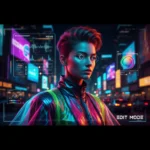
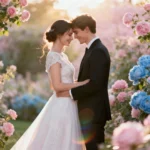
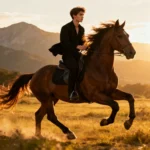
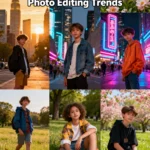
A glamorous AI-generated fashion shoot edited using Gemini for a magazine-style finish
Loading...
What Makes Magazine-Style Edits Go Viral
You’ve probably scrolled through Instagram, seen a breathtaking photo, and wondered—how do they do that? It’s not just the pose or lighting; it’s the style. Magazine-style edits are all about contrast, composition, and storytelling. They feel cinematic, like you’re flipping through Vogue or GQ.
Images go viral when they evoke an emotion—glamour, nostalgia, or even power. The secret lies in how naturally professional the shot looks, without appearing overdone.
High-end magazines like Vogue, National Geographic, and GQ often rely on balanced tones, creative shadows, and emotional weight. Vogue’s visual storytelling standards and NatGeo’s editorial photography principles both emphasize this balance between art and authenticity.
Why Gemini AI Is Changing Photo Editing
Gemini AI, developed by Google, has taken image generation and editing to new heights. Unlike most AI tools, Gemini doesn’t just “enhance” photos—it understands style intention. It reads the vibe you’re going for. Whether it’s moody noir, glossy editorial, or retro chic, Gemini interprets that prompt contextually.
I’ve noticed something compelling while experimenting with it. Gemini AI doesn’t just fix lighting or smooth skin; it reshapes composition to align with your concept. That’s something you rarely see even in advanced editors like Photoshop combined with Lightroom presets.
You can read more about how Gemini AI interprets visual language through Google’s official Gemini Research Overview.
10 Viral Gemini AI Photo Editing Prompts
Here are the 10 viral Gemini AI photo editing prompts along with guidance on how to write them effectively for best results:
Runway Editorial under Natural Light Prompt example: “Create a sharp yet airy runway editorial photo under natural light, maintaining natural skin tones with soft shadows that define cheekbones, featuring subtle desaturation for a chic magazine look.” How to write: Focus on lighting type (natural), tonal balance (subtle desaturation), and facial contour details (soft shadows). Mention the magazine style (runway editorial).
Cinematic Portrait with Dust and Motion Blur Prompt example: “Generate a moody cinematic portrait with gentle dust particles and motion blur effects that capture wind movement, preserving sharp facial detail and a mysterious atmosphere.” How to write: Specify atmosphere (moody, cinematic), effects (dust, motion blur), and detail retention (sharp facial features).
Glossy Beauty Editorial with Pearl Highlights Prompt example: “Produce a glossy beauty editorial image with pearl-like highlights on the skin, enhancing radiance while keeping an editorial, approachable vibe.” How to write: Emphasize finish (glossy), highlight style (pearl), and overall mood (editorial, approachable).
Minimal Street Fashion Look in Urban Dusk Prompt example: “Create a minimal street fashion portrait with soft orange dusk lighting, urban textures, muted whites, and subtle lens flares for a high-end editorial feel.” How to write: Include lighting condition (dusk), background vibe (urban textures), and stylistic accents (muted whites, lens flares).
High Fashion Drama with Shallow Depth of Field Prompt example: “Edit a high fashion portrait with shallow depth of field, enhancing fabric textures and softly blurring the background for a DSLR-quality editorial effect.” How to write: Highlight focus effect (shallow depth), texture enhancement, and background treatment (soft blur).
Golden Hour Digital Vogue Style Prompt example: “Generate a golden hour fashion portrait with warm sunlight reflections delivering a luxurious digital Vogue-style aesthetic.” How to write: Indicate time of day (golden hour), lighting effect (sunlight reflections), and magazine inspiration (Vogue style).
Monochrome Luxe Editorial Tone Prompt example: “Create a luxurious monochrome editorial portrait with intentional shadows and clean edges, reminiscent of high-end black-and-white fashion shoots.” How to write: Specify color scheme (monochrome), tone (luxurious), and detail focus (shadows, edges).
Soft Glam Retro 80s Magazine Scene Prompt example: “Produce a soft glam retro 80s-inspired magazine photo with pastel highlights, slight film grain, and vintage paper texture effects.” How to write: Reference decade/style (retro 80s), finish (soft glam), and texture details (film grain, paper texture).
Luxury Commercial Product with Mirror Reflection Prompt example: “Edit a luxury commercial product photo with realistic mirror reflections and transparent glass effects optimized for e-commerce banners.” How to write: Mention product type (luxury commercial), visual effects (mirror reflection, glass transparency), and use case (e-commerce).
Editorial Couple Portrait with Dreamy Pastel Atmosphere Prompt example: “Create a dreamy editorial couple portrait with pastel tones, light bokeh, and softly blurred edges for a timeless romantic magazine cover look.” How to write: Focus on mood (dreamy, romantic), color palette (pastels), and effects (bokeh, soft blur).
My Personal Editing Anecdotes
Let me share something honest—I used to rely heavily on Lightroom presets. But the results often looked “template-like.” Gemini, on the other hand, adapts dynamically. When I uploaded a monochrome portrait, it automatically enhanced facial contours with slight metallic toning. No prompt tweaking needed.
Once, I asked Gemini to create a magazine-style cityscape shot under rain reflections. It produced something eerily real, with droplets streaking down like they had intent. That was the moment I realized—Gemini isn’t just a photo editor; it’s more like a story collaborator.
Pro Tips for Getting Magazine-Level Shots
Start with balanced lighting. Gemini performs best when your base image already has consistent exposure.
Use descriptive language in prompts. Instead of “fashion photo,” say “Vogue-style editorial with soft morning shadows.”
Avoid over-processing. The AI’s realism can break with overdone filters. Subtlety wins every time.
Complement your edit with slight post-touching. I use Canva or Lightroom Mobile for the final polish.
Always read magazine shots for inspiration. Check Elle, Bazaar, or Numero for composition ideas.
Magazine-Style ChatGPT Photo Editing Prompts
Now let’s talk about Magazine-Style Viral ChatGPT Photo Editing Prompts. Surprising as it sounds, ChatGPT (paired with integrated visual models) can also generate stunning edit instructions.
Prompt Example: “Refine this portrait into a soft editorial look inspired by Harper’s Bazaar, emphasizing warm whites, muted contrast, and a subtle vignette.”
ChatGPT works great when you’re iterating concepts before final editing in Gemini. It structures stylistic directions and layers intent in natural language. Many creators blend both tools—ChatGPT for creative ideation, Gemini for direct image generation.
FAQs
1. How can I make my Gemini AI photos look more magazine-like?
Use descriptive prompts focusing on mood, light, and texture rather than just filters. Gemini responds better to scene ideas than technical commands.
2. Are Gemini AI edits suitable for commercial work?
Yes, they’re highly adaptable for branding, fashion, or commercial purposes. Just ensure the output aligns with copyright usage terms.
3. What’s the best lighting setup before editing with Gemini?
Natural daylight or soft studio lighting works best. Avoid harsh, single-direction light sources.
4. Can ChatGPT generate visual prompts for Gemini AI effectively?
Definitely. ChatGPT is perfect for pre-visualizing your scene or refining Gemini instructions linguistically.
5. Do I need a professional background in photo editing to use Gemini AI?
Not at all. It’s intuitive and designed for both hobbyists and creative professionals. The real magic lies in experimenting with prompt vocabulary.
Ovais Mirza, a seasoned professional blogger, delves into an intriguing blend of subjects with finesse. With a passion for gaming, he navigates virtual realms, unraveling intricacies and sharing insights. His exploration extends to the realm of hacking, where he navigates the fine line between ethical and malicious hacking, offering readers a nuanced perspective. Ovais also demystifies the realm of AI, unraveling its potential and societal impacts. Surprisingly diverse, he sheds light on car donation, intertwining technology and philanthropy. Through his articulate prose, Ovais Mirza captivates audiences, fostering an intellectual journey through gaming, hacking, AI, and charitable endeavors.
Disclaimer: The articles has been written for educational purpose only. We don’t encourage hacking or cracking. In fact we are here discussing the ways that hackers are using to hack our digital assets. If we know, what methods they are using to hack, we are in very well position to secure us. It is therefore at the end of the article we also mention the prevention measures to secure us.