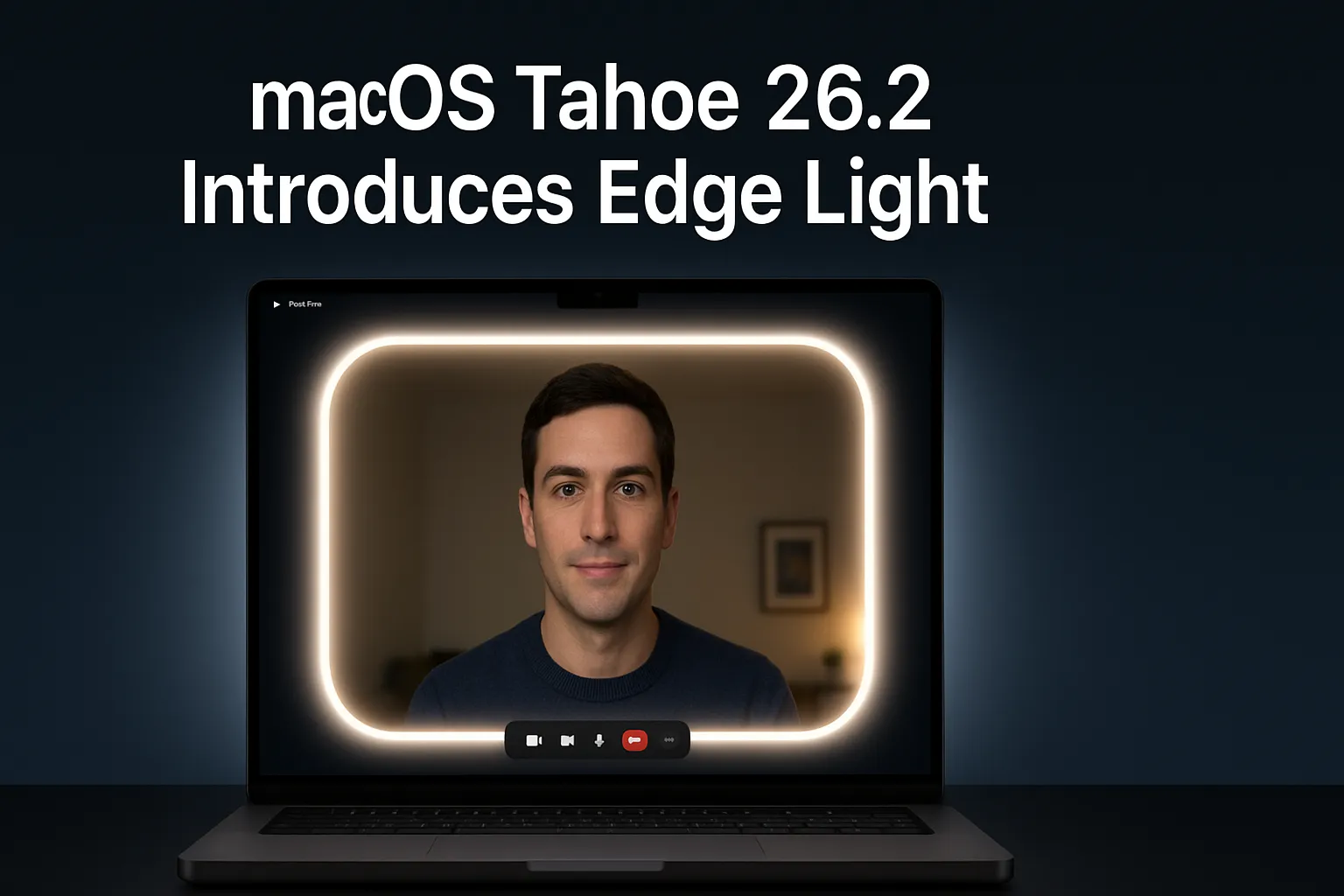
macOS Tahoe 26.2 Introduces Edge Light
When Apple rolled out macOS Tahoe 26.2, I wasn’t expecting anything dramatic. Maybe a few security patches, some subtle refinements here and there. But the moment I came across the new Edge Light feature, it felt like one of those “finally!” moments. Anyone who takes video calls—even if it’s just once a week—knows how irritating poor lighting can be. Either you’re sitting in a dim room, or the overhead light is casting weird shadows, or you end up looking like you’re in a suspense thriller movie.
Apple seems to have felt that pain too. And with this update, they’ve quietly solved a problem millions have without even realizing how much they needed this fix.
What Exactly Is Edge Light in macOS Tahoe 26.2?
Edge Light is Apple’s new built-in virtual ring-light system that literally turns the edges of your Mac’s display into a soft, glowing illumination source. Unlike external ring lights that clutter your desk, Edge Light is purely digital—no attachments, no wires, nothing extra.
It brightens your face naturally, smoothens shadows, and adapts to whatever lighting situation you’re sitting in. Think of it as having a little lighting assistant that never complains, doesn’t take up space, and knows exactly when to shine.
Apple didn’t mention a lot about the back-end tech during the announcement, but various sources, including Apple’s official update page (https://apple.com/macos), confirm how deeply integrated this feature is with the system.
Why Apple Introduced This Feature
Over the last few years, the world has shifted enough that video calls aren’t just a remote work thing. Students, vloggers, corporate teams, freelancers—pretty much all of us live on video calls now.
And lighting has always been one of the biggest problems. I remember one evening call where I was sitting near a window. The sun was setting behind me, and I looked like a silhouette from a crime documentary. Not my best meeting, trust me.
Apple saw that pain point. Their solution? Build the light into the Mac. No accessories required, no “Wait, let me just adjust my lamp” moments.
How Edge Light Works
The beauty of Edge Light is that it doesn’t act like a harsh flashlight. Instead, it uses multiple Apple technologies layered together to produce a subtle and almost cinematic look.
1. Neural Engine-Powered Face Detection
Edge Light uses the Apple Neural Engine to identify:
- where your face is,
- how large it appears on the screen,
- and the angle you’re sitting at.
Then it automatically adjusts the brightness and direction of the edge glow to make you look clear. I tested it by moving slightly off-center and was surprised how smoothly it adapted.
2. Auto Room-Light Detection
If your room light drops, Edge Light gently increases brightness.
If the lighting improves, it quietly dims.
I tried switching off my desk lamp, and within seconds Edge Light compensated without me touching anything.
3. Smart Fade-Out
Sometimes, I move my mouse to the edges of the screen, and I worried Edge Light would block menus or buttons. But Apple added a smart fade-out effect. Whenever the cursor gets close to any edge, the brightness there decreases slightly so the screen stays usable.
4. Adjustable Color Temperature
There’s a slider that lets you choose:
- Warm tones (great for nights),
- Cool tones (perfect for office or daylight).
This is something I personally loved. Warm tones make Zoom calls feel less harsh on the eyes during late-night meetings.
Real-World Experience: My First Try
Let me share a quick anecdote. A day after updating, I joined a Zoom call without realizing Edge Light was active. One of my colleagues said, “Wow, your lighting looks professional today.”
I laughed because I wasn’t using any lamp. Just my MacBook’s display.
And I’ll admit—my face looked more even, more natural. For someone who frequently speaks with clients, that makes a real difference.
Device Compatibility
Edge Light supports:
- All Apple Silicon Macs
- Studio Display when connected to an Apple Silicon Mac
- External webcams that support macOS
- Macs released 2024 onward can enable auto activation in dark rooms
That means most modern Mac users can enjoy this feature without needing new hardware.
Where To Find Edge Light
You’ll find the option under:
Video Effects → Edge Light
It’s available across major platforms:
- FaceTime
- Zoom
- Teams
- WebEx
- Google Meet
- and other conferencing tools
It appears alongside Apple’s known effects such as:
- Portrait Mode
- Studio Light
- Background Blur
- Voice Isolation
Edge Light vs External Ring Lights
Here’s a quick comparison based on my experience and Apple’s documentation (https://support.apple.com):
| Feature | Edge Light (macOS 26.2) | External Ring Light |
|---|---|---|
| Hardware Needed | None | Yes |
| Cost | Free | Paid |
| Desk Space | No usage | Takes space |
| Auto Brightness | Yes | No |
| Temperature Options | Yes | Depends on model |
| Compatibility | All apps | All apps |
| Fade-Out for Screen Use | Yes | No |
| Portability | Built-in | Limited |
You don’t need to mount anything, adjust angles, or deal with bulky stands.
Who Will Benefit the Most?
1. Remote Workers
Clear visibility during calls boosts communication—and impressions.
2. Students
No more dim hostel rooms messing up class presentations.
3. Content Creators
While pros may still prefer full lighting setups, this helps with casual recordings or interviews.
4. Business Professionals
Evening or late-night meetings? No problem.
5. Anyone with small desk space
No clutter. No wires.
Final Thoughts
I’ve used multiple lighting accessories over the years—ring lights, softboxes, desk lamps. They work, but they take space, consume power, and honestly, feel overkill for everyday video calls.
Edge Light, on the other hand, is smart, clean, automatic, and surprisingly effective. Apple didn’t make a big flashy announcement about this feature, but it’s one of those rare upgrades that genuinely improves daily life.
Sometimes the smallest updates leave the biggest impact.
FAQs
No, Apple has restricted it to Apple Silicon Macs due to the reliance on the Neural Engine and other modern hardware capabilities.
Absolutely. It’s a toggle-based feature inside the Video Effects menu.
Yes, but only when paired with an Apple Silicon Mac.
Not entirely. It’s fantastic for everyday use, but advanced creators might still prefer multi-source lighting.
Slightly, because it increases display brightness around edges—but in real usage, the impact is minimal.