Create Bollywood-inspired Kabir Singh portraits using Gemini AI
Loading...
Why This Trend Is Taking Over
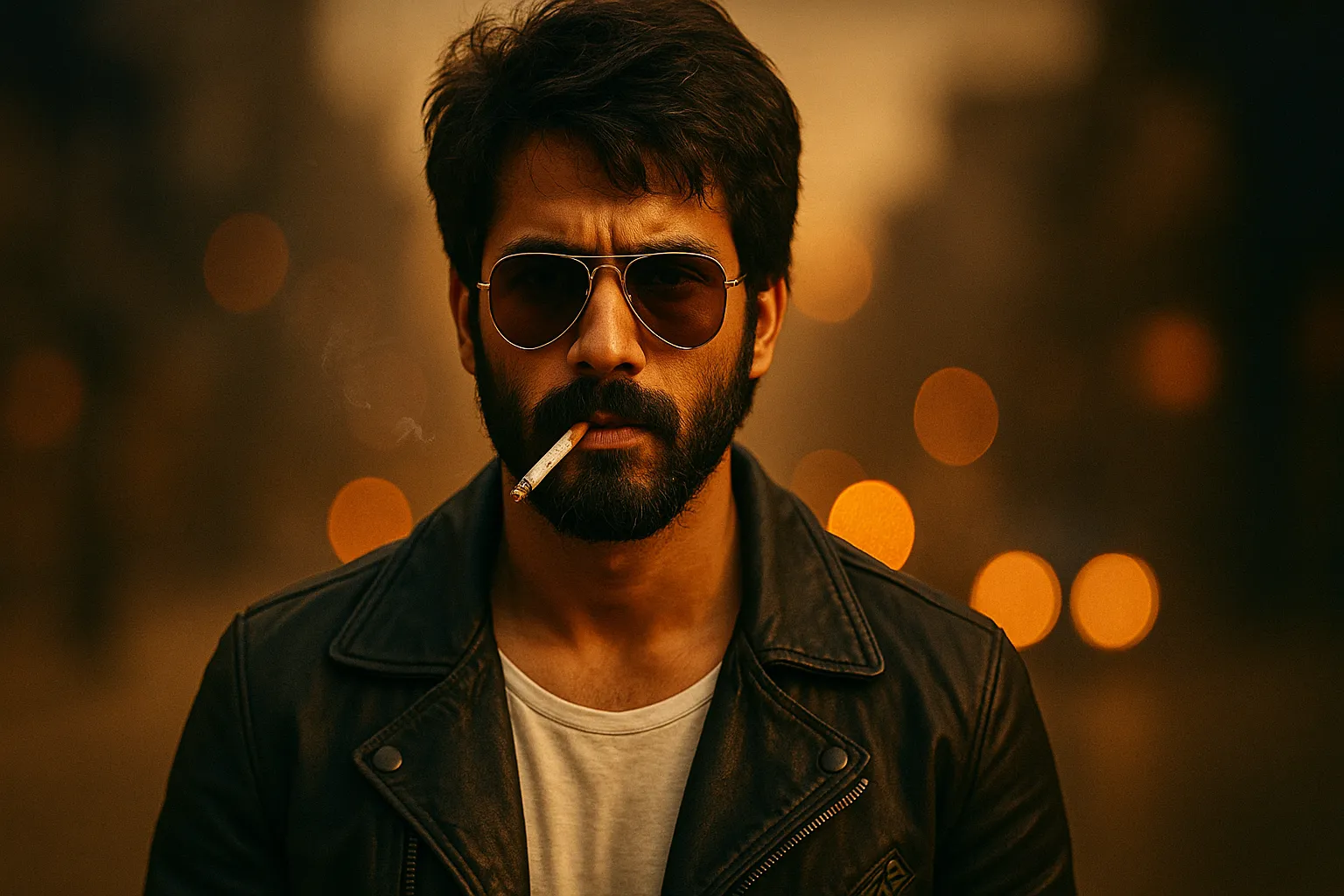
You might have noticed your feed recently — cinematic portraits, dark tones, and moody expressions all over Instagram. That’s the Kabir Singh AI photo trend, and honestly, I’m not surprised.
It captures something raw and masculine — that rugged charm we saw in Shahid Kapoor’s Kabir Singh. Guys are now turning ordinary selfies into dramatic, film-poster–style portraits using Google’s Gemini AI.
If you’ve ever wanted to look like a Bollywood anti-hero — calm, intense, emotional — this is your moment. In this post, I’ll show you exactly how I created my Kabir Singh–inspired look using Gemini AI, along with four of the best ready-to-use prompts you can simply copy and paste.
What Is Gemini AI and How It Works
Gemini AI is Google’s next-generation AI platform that lets you edit and generate images directly through text prompts. You just describe what you want, and the model — particularly the Nano Banana image model — does the magic.
According to Google’s official blog, Gemini AI’s new tools can change backgrounds, lighting, facial tone, and even add cinematic effects with incredible realism.
So, instead of manually tweaking filters, you can just type:
“Create a cinematic portrait in Kabir Singh style,” and Gemini AI will handle the rest — lighting, atmosphere, and mood included.
It’s like having a professional photo editor, cinematographer, and stylist rolled into one.
The Kabir Singh Aesthetic Explained
When I think of the Kabir Singh look, a few things instantly come to mind:
A messy hairstyle, slightly unkempt but effortlessly cool.
A rugged beard — not overly neat, just real and masculine.
Aviator sunglasses, leather jacket, and a confident slouch.
Dark tones — deep blues, browns, and warm golden lights.
The mood: brooding, rebellious, emotional.
This style is cinematic but deeply personal — it’s not just about how you look, it’s about what you feel. It shows confidence, pain, and solitude — all in one frame.
So when writing your Gemini AI prompt, don’t just describe clothes or lighting. Add emotion: “intense eyes,” “calm but broken,” “thoughtful yet strong.” That’s the real essence of the Kabir Singh vibe.
Step-by-Step: Editing Your Photo in Gemini AI
Here’s exactly how I do it — simple and effective:
Take a clear, front-facing selfie — good light, neutral background.
Choose your background or lighting vibe — sunset, rain, night street, etc.
Set resolution to 4K or 8K for maximum detail.
Hit Generate and wait a few seconds.
If needed, tweak sharpness or tone slightly.
Pro tip: Don’t over-filter your photo. The charm lies in realism, not over-editing.
Top 4 Kabir Singh–Style Prompts for Boys
Each of these prompts has been written for realism, mood, and emotional depth. Just upload your picture and paste one.
Prompt 1: The Classic Kabir Singh Look
“Create an ultra-realistic cinematic portrait of the uploaded person, maintaining exact facial likeness and emotion. Depict a rugged young Indian man sitting on a Royal Enfield Bullet at dusk, wearing a black leather jacket over a white T-shirt, dark jeans, and aviator sunglasses. His beard is full and trimmed, hair slightly messy, and expression calm yet intense, with cigarette smoke curling in the air. The background shows a dimly lit urban street with warm golden streetlights, scattered dust in the glow, and a faint bokeh effect. The atmosphere is cinematic, moody, and deeply emotional — capturing the essence of a modern anti-hero in 8K ultra-realism, soft lens blur, and volumetric lighting.”
Prompt 2: Rain Rebellion
“Generate a cinematic mid-shot portrait of a young man standing in the rain, preserving exact facial likeness. He wears a soaked white shirt unbuttoned at the top, revealing a thin chain around his neck. His expression is raw and emotional — eyes filled with pain and intensity, hair drenched and sticking to his forehead. He holds a half-empty glass bottle loosely in his right hand, streetlights reflecting on the wet pavement. The lighting is cold blue and amber, evoking heartbreak and chaos. The atmosphere is moody, cinematic, and emotionally charged, with water droplets frozen in motion, rendered in 8K hyper-realistic quality.”
Prompt 3: The Doctor’s Calm
“Create an ultra-realistic portrait of the uploaded person wearing a doctor’s white coat, stethoscope around the neck, and rolled-up sleeves, standing near a hospital window during sunset. His hair is tousled, beard neat, and expression introspective yet proud. The golden hour light gently illuminates his face, reflecting ambition and solitude. Outside the window, city lights begin to glow, adding warmth and contrast. The overall tone is cinematic and reflective, blending Kabir Singh’s professional side with emotional depth, shot in soft-focus 8K realism with natural lighting and shallow depth of field.”
Prompt 4: The Night Rider
“Create an ultra-realistic cinematic night scene featuring the uploaded person, preserving facial features and likeness. Depict a rugged young man riding a Royal Enfield through an empty road under dim streetlights. He wears a black leather jacket, fingerless gloves, and a determined expression as smoke trails behind. The street glistens from recent rain, with reflections of neon lights shimmering in the puddles. His hair blows slightly in the night breeze, and the headlight creates a dramatic lens flare. The mood is mysterious, rebellious, and deeply cinematic, rendered in 8K with high contrast, motion blur, and volumetric smoke lighting.”
Enhancement Tip: Add these words to any prompt for an extra cinematic touch:
“film grain, lens flare, soft focus, bokeh, warm golden light, moody blue tone, cinematic depth.”
Expert Tips for Better Results
Lighting is everything. Always shoot in golden hour or soft daylight.
Expression matters. Don’t smile too much — go for calm, intense, or thoughtful looks.
Props help. Try a helmet, leather jacket, or coffee mug to create realism.
Keep backgrounds simple. Empty streets, rain-soaked roads, or city skylines work best.
Always choose high resolution (4K or 8K). It makes your photo look cinematic.
Respect privacy. Before uploading, remove image metadata.
Conclusion
With the right words and the right attitude, even a simple selfie can transform into a Bollywood-level cinematic portrait.
The Kabir Singh–Inspired Gemini AI Photo Editor Prompts for Boys aren’t just about looks — they’re about capturing emotion, attitude, and presence. So go ahead — upload your selfie, paste a prompt, and turn your picture into something unforgettable.
Every man has a story. It’s time to let Gemini AI capture yours.
Frequently Asked Questions (FAQs)
Q1. How clear should my photo be before uploading?
Your photo should be front-facing, well-lit, and simple. Avoid busy backgrounds so the AI focuses on your face.
Q2. Can I include my name or movie titles in the prompt?
Yes, but keep it minimal. AI models respond better to mood and setting descriptions than to brand or title names.
Q3. Can girls use these prompts too?
Of course! Just tweak the outfit, expression, and lighting to fit your own vibe.
Q4. What if my photo doesn’t look rugged or intense?
That’s fine — the AI adds those tones automatically. You can emphasize intensity through your eyes and lighting.
Q5. Is it safe to upload personal photos to Gemini AI?
Mostly yes — but always read the terms and remove personal data before uploading, just to stay safe.
Ovais Mirza, a seasoned professional blogger, delves into an intriguing blend of subjects with finesse. With a passion for gaming, he navigates virtual realms, unraveling intricacies and sharing insights. His exploration extends to the realm of hacking, where he navigates the fine line between ethical and malicious hacking, offering readers a nuanced perspective. Ovais also demystifies the realm of AI, unraveling its potential and societal impacts. Surprisingly diverse, he sheds light on car donation, intertwining technology and philanthropy. Through his articulate prose, Ovais Mirza captivates audiences, fostering an intellectual journey through gaming, hacking, AI, and charitable endeavors.
Disclaimer: The articles has been written for educational purpose only. We don’t encourage hacking or cracking. In fact we are here discussing the ways that hackers are using to hack our digital assets. If we know, what methods they are using to hack, we are in very well position to secure us. It is therefore at the end of the article we also mention the prevention measures to secure us.