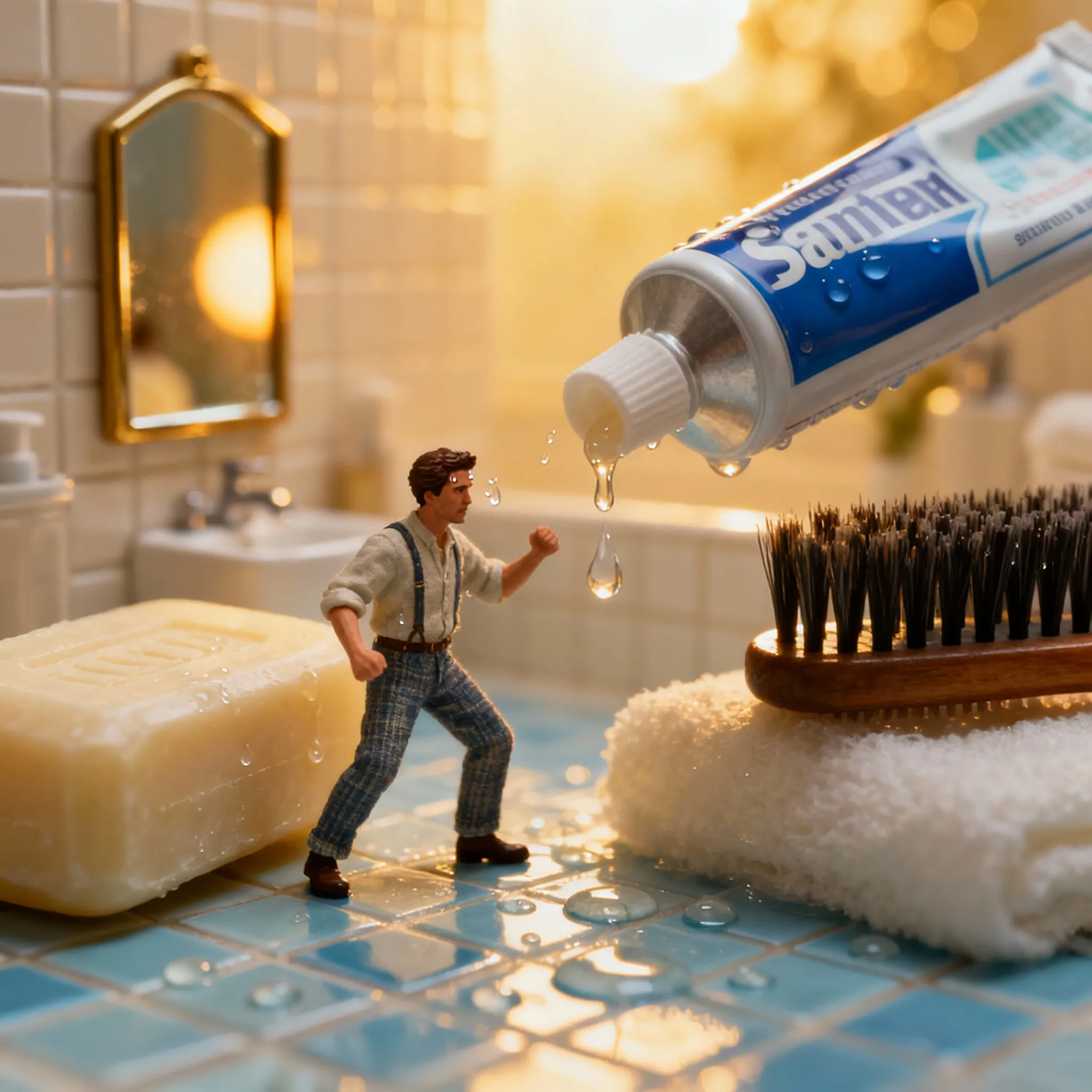
A cinematic miniature portrait featuring a tiny man on a soap bar created with Gemini
Loading...
Introduction: What is Gemini AI Nano Banana?
Hey, if you haven’t tried Gemini AI’s Nano Banana mode yet, you’re in for a treat! This newest image generation feature lets you take a plain portrait and instantly turn it into a tiny 3D figurine with ultra-realistic details and cinematic flair. Imagine your photo transformed into a collectible miniature scene—you can create shelf-worthy art or whimsical toy-box worlds in stunning 8K resolution. Nano Banana handles lifelike lighting, creamy bokeh, and intricate textures to bring your imagination to life.
The key? Detailed prompts. The better you describe your miniature scene, scale, base, and lighting, the more realistic and viral-worthy your creation becomes. Let me walk you through five epic prompts that are trending now for creating these mini-masterpieces.
Prompt 1: The Miniature Man’s Battle on a Giant Bar of Soap
Picture this: a tiny man perched on a giant bar of soap in a vast white bathroom, humorously struggling to brush his teeth. His face shows a wide-eyed surprise framed by wet, disheveled hair. The golden hour sunlight pouring in casts long natural shadows and a warm glow, making the scene feel cozy yet cinematic. He’s dressed in cute sleepwear, holding a toothbrush scaled just right for his miniature size. To nail this look, mention a 50mm lens at f/1.8 for creamy bokeh, natural color grading, and perfect high-res textures. The aspect ratio is 2:3 for that professional portrait feel.
This prompt’s playful take combines humor and realism, perfect for anyone wanting a fun yet polished miniature portrait.
Prompt 2: Perched on a Toothpaste Tube Adventure
Taking the concept up a notch, this prompt swaps the bar of soap for a toothpaste tube—imagine the tiny man standing atop his toothpaste podium! Everything else stays consistent: his shocked expression, wet hair, and cozy sleepwear, with the golden hour lighting reinforcing natural warmth and shadows. The bathroom setting remains vast and pristine, with detailed textures and creamy bokeh highlighting the figure’s miniature struggle.
This prompt adds a fresh element while maintaining the charm and photorealism of the original. It’s an excellent way to experiment with tiny object bases for your figurine edits.
Prompt 3: Shampoo Bottle Toothbrushing Drama
Next, let’s place our miniature protagonist on a shampoo bottle. The scene is humorously dramatic as he tries to brush his teeth, water spraying and reflecting off surfaces, giving that funny yet lifelike surprise expression. Wet, messy hair and cute sleepwear complete the miniature man’s look. Natural sunlight floods through the windows, casting soft, elongated shadows that create depth using a 50mm lens and f/1.8 aperture for creamy background blur and smooth color tones.
This one is a crowd favorite because the shampoo bottle adds an interesting shape and texture contrast, making the figurine stand out in its “bathroom battlefield.”
Prompt 4: Comb Conqueror in a Miniature Bathroom
For prompt four, the miniature man battles atop a giant comb instead of bottles or bars. His tiny frame clings to the sleek, detailed ridges of the comb as he tries to brush his teeth with matching mini-toothbrush. His facial expression again captures wide-eyed surprise, framed by tousled wet hair in sleepwear, all under golden hour lighting that bathes the scene in warmth and casts soft natural shadows. The 8K ultra-realistic detail shines here with intricate textures on the comb and lifelike skin tones.
It’s a fresh take that brings out the artistic side of global miniature photo editing trends, combining everyday objects with fantastical scale shifts.
Prompt 5: Brave on a Hair Dryer Throne
Finally, for the grand finale, imagine the tiny man seated on a giant hair dryer, bracing himself for the epic toothbrushing task ahead. Water sprays add dynamic effects to his surprised expression framed by messy wet hair and cozy sleepwear. Warm golden hour light glares softly through bathroom windows, highlighting the gloss and textures of the hair dryer base and the miniature man’s detailed figurine clothing and skin. The 50mm lens at f/1.8 aperture brings that creamy bokeh rich in cinematic quality to the photo, making every element pop with poise and professionalism.
This scene perfectly encapsulates the blend of whimsical narrative and high realism that Gemini AI’s Nano Banana model excels at.
How to Create Miniature Portraits with Gemini AI
So, ready to try these prompts yourself? Here’s a quick guide I use:
Grab a clear, well-lit portrait with a neutral background.
Open Gemini AI’s editor or launch Nano Banana mode on their web or app interface.
Upload your photo.
Use one of the detailed prompts from above, or tweak them to fit your style (pose, base object, lighting).
Hit generate.
Refine your scene by adjusting pose, lighting, or details through short text prompts.
Download your final 8K masterpiece for social sharing or printing.
These steps will have you creating viral miniature worlds in seconds!
FAQs
Q1: What type of photos work best with Gemini AI Nano Banana prompts?
A: Clear, well-lit portraits with neutral backgrounds give the AI the best base to create detailed miniature effects.
Q2: Can I customize scenes beyond these prompts?
A: Absolutely! You can tweak scale, base objects, lighting, and poses to fit your creative vision.
Q3: What resolution do these edits output?
A: Gemini AI supports up to 8K ultra-high resolution for crisp, gallery-quality images.
Q4: Is the facial identity preserved in all edits?
A: Yes, the AI maintains face consistency and likeness, ensuring the miniature figurine still looks like you.
Q5: Can I use these images for commercial purposes?
A: Usually yes, but always check Gemini AI’s licensing terms for generated content use rights.
Ovais Mirza, a seasoned professional blogger, delves into an intriguing blend of subjects with finesse. With a passion for gaming, he navigates virtual realms, unraveling intricacies and sharing insights. His exploration extends to the realm of hacking, where he navigates the fine line between ethical and malicious hacking, offering readers a nuanced perspective. Ovais also demystifies the realm of AI, unraveling its potential and societal impacts. Surprisingly diverse, he sheds light on car donation, intertwining technology and philanthropy. Through his articulate prose, Ovais Mirza captivates audiences, fostering an intellectual journey through gaming, hacking, AI, and charitable endeavors.
Disclaimer: The articles has been written for educational purpose only. We don’t encourage hacking or cracking. In fact we are here discussing the ways that hackers are using to hack our digital assets. If we know, what methods they are using to hack, we are in very well position to secure us. It is therefore at the end of the article we also mention the prevention measures to secure us.